Webhooks Guide
Complete guide to Loyalteez webhooks for real-time event notifications.
Overview
Loyalteez currently supports:
- ✅ Stripe Payments - Production ready
- ✅ Constraint Cache Invalidation - For external API purchase constraints
Stripe Webhooks (Production Ready)
Setup
1. Configure Stripe Webhook in Your Dashboard:
Go to Stripe Dashboard → Developers → Webhooks
Endpoint URL:
https://api.loyalteez.app/loyalteez-api/stripe-mint
Events to Select:
checkout.session.completedpayment_intent.succeeded
2. Get Your Webhook Secret:
Stripe provides a webhook signing secret (starts with whsec_...). You'll need this for signature verification.
Webhook Flow
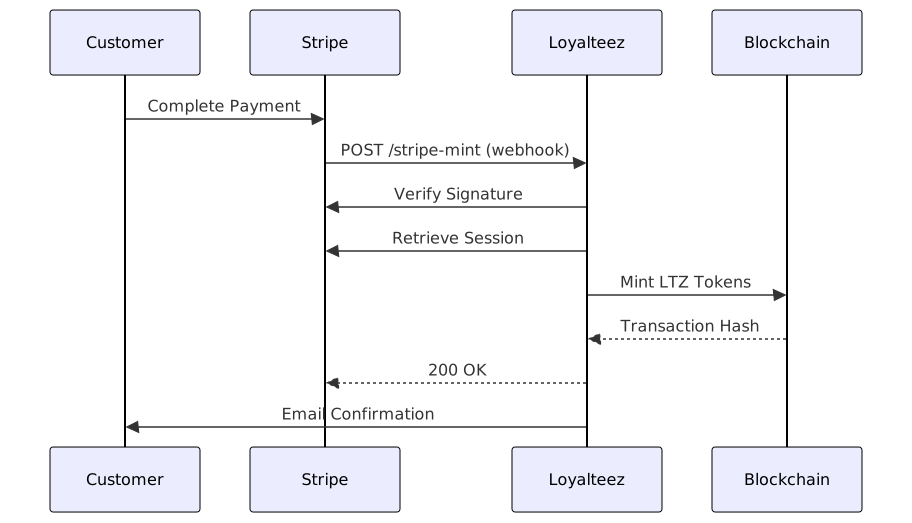
Stripe Mint Webhook
Endpoint:
POST https://api.loyalteez.app/loyalteez-api/stripe-mint
Payload:
{
  "sessionId": "cs_test_a1b2c3..."
}
Headers:
Content-Type: application/json
Response (Success):
{
  "success": true,
  "message": "LTZ tokens minted successfully",
  "txHash": "0xabc123...",
  "blockExplorer": "https://soneium.blockscout.com/tx/0xabc123...",
  "walletAddress": "0x1234...5678",
  "usdAmount": 10,
  "ltzAmount": 10000,
  "paymentIntentId": "pi_..."
}
Response (Already Processed):
{
  "success": true,
  "message": "Payment already processed",
  "txHash": "0xabc123...",
  "walletAddress": "0x1234...5678",
  "usdAmount": 10,
  "ltzAmount": 10000,
  "paymentIntentId": "pi_...",
  "alreadyProcessed": true
}
Response (Error):
{
  "success": false,
  "message": "Payment not completed: unpaid"
}
Integration Example
Node.js/Express:
const express = require('express');
const app = express();

// Stripe webhook handler
app.post('/webhooks/stripe', express.raw({ type: 'application/json' }), async (req, res) => {
  const sig = req.headers['stripe-signature'];
  const webhookSecret = process.env.STRIPE_WEBHOOK_SECRET;

  let event;

  try {
    // Verify Stripe signature
    event = stripe.webhooks.constructEvent(req.body, sig, webhookSecret);
  } catch (err) {
    console.error('Webhook signature verification failed:', err.message);
    return res.status(400).send(`Webhook Error: ${err.message}`);
  }

  // Handle the event
  switch (event.type) {
    case 'checkout.session.completed': {
      const session = event.data.object;

      // Forward to Loyalteez for minting
      await fetch('https://api.loyalteez.app/loyalteez-api/stripe-mint', {
        method: 'POST',
        headers: { 'Content-Type': 'application/json' },
        body: JSON.stringify({
          sessionId: session.id
        })
      });

      break;
    }

    case 'payment_intent.succeeded': {
      const paymentIntent = event.data.object;
      console.log('Payment succeeded:', paymentIntent.id);
      break;
    }

    default:
      console.log(`Unhandled event type: ${event.type}`);
  }

  res.json({ received: true });
});
Testing Stripe Webhooks
1. Use Stripe CLI:
# Install Stripe CLI
# https://stripe.com/docs/stripe-cli

# Forward webhooks to local development
stripe listen --forward-to localhost:3000/webhooks/stripe

# Trigger test webhook
stripe trigger checkout.session.completed
2. Test with cURL:
# Create test checkout session
curl -X POST https://api.stripe.com/v1/checkout/sessions \
  -u "sk_test_YOUR_KEY:" \
  -d "mode=payment" \
  -d "success_url=https://example.com/success" \
  -d "line_items[0][price]=price_..." \
  -d "line_items[0][quantity]=1"

# Complete payment (use Stripe test card: 4242 4242 4242 4242)

# Webhook automatically triggers
Error Handling
Common Issues:
| Error | Cause | Solution |
|---|---|---|
Session not found | Invalid session ID | Verify session ID is correct |
Payment not completed | Payment still pending | Wait for payment confirmation |
Invalid wallet address | Missing/invalid wallet in metadata | Ensure wallet is in session metadata |
Invalid amount | Incorrect USD/LTZ conversion | Verify 1 USD = 1000 LTZ |
Amount mismatch | Math doesn't match | Check usd_amount * 1000 = ltz_amount |
Already processed | Duplicate webhook | This is OK - idempotent response |
Retry Logic:
async function callStripeMintWithRetry(sessionId, maxRetries = 3) {
  for (let attempt = 1; attempt <= maxRetries; attempt++) {
    try {
      const response = await fetch(
        'https://api.loyalteez.app/loyalteez-api/stripe-mint',
        {
          method: 'POST',
          headers: { 'Content-Type': 'application/json' },
          body: JSON.stringify({ sessionId })
        }
      );

      if (response.ok) {
        return await response.json();
      }

      // If 500 error, retry
      if (response.status === 500 && attempt < maxRetries) {
        const delay = Math.pow(2, attempt) * 1000; // 2s, 4s, 8s
        await new Promise(resolve => setTimeout(resolve, delay));
        continue;
      }

      throw new Error(`HTTP ${response.status}`);

    } catch (error) {
      if (attempt === maxRetries) {
        throw error;
      }
    }
  }
}
Session Metadata Requirements
When creating Stripe checkout sessions, include these in metadata:
Required Metadata:
| Field | Type | Description | Example |
|---|---|---|---|
wallet | string | User's wallet address | "0x1234...5678" |
usd_amount | string | USD amount (dollars) | "10" |
ltz_amount | string | LTZ tokens to mint | "10000" |
Example:
const session = await stripe.checkout.sessions.create({
  mode: 'payment',
  line_items: [{
    price_data: {
      currency: 'usd',
      product_data: { name: 'LTZ Tokens' },
      unit_amount: 1000, // $10.00
    },
    quantity: 1,
  }],
  metadata: {
    wallet: userWalletAddress,
    usd_amount: '10',
    ltz_amount: '10000'
  },
  success_url: 'https://yoursite.com/success',
  cancel_url: 'https://yoursite.com/cancel',
});
Security Best Practices
1. Verify Signatures
Always verify webhook signatures to ensure requests are from Loyalteez:
const signature = req.headers['x-loyalteez-signature'];

if (!verifySignature(req.body, signature, secret)) {
  return res.status(401).json({ error: 'Invalid signature' });
}
2. Use HTTPS
Webhook endpoints must use HTTPS:
✅ https://yoursite.com/webhooks/loyalteez
❌ http://yoursite.com/webhooks/loyalteez
3. Validate Payload
function validateWebhookPayload(data) {
  if (!data.id || !data.type || !data.created) {
    throw new Error('Invalid webhook payload');
  }

  if (!data.data || typeof data.data !== 'object') {
    throw new Error('Missing webhook data');
  }

  return true;
}
4. Idempotency
Store processed webhook IDs to prevent duplicate processing:
const processedWebhooks = new Set();

async function handleWebhook(event) {
  if (processedWebhooks.has(event.id)) {
    console.log('Webhook already processed:', event.id);
    return;
  }

  // Process webhook
  await processEvent(event);

  // Mark as processed
  processedWebhooks.add(event.id);

  // Persist to database
  await db.processedWebhooks.create({ id: event.id });
}
5. Rate Limiting
Implement rate limiting on webhook endpoints:
const rateLimit = require('express-rate-limit');

const webhookLimiter = rateLimit({
  windowMs: 1 * 60 * 1000, // 1 minute
  max: 100, // 100 requests per minute
  message: 'Too many webhook requests'
});

app.post('/webhooks/loyalteez', webhookLimiter, handleWebhook);
Testing Webhooks
Local Development
Use ngrok for local testing:
# Install ngrok
# https://ngrok.com/download

# Expose local port
ngrok http 3000

# Use ngrok URL as webhook endpoint
# https://abc123.ngrok.io/webhooks/loyalteez
Test webhook locally:
# Send test webhook
curl -X POST http://localhost:3000/webhooks/loyalteez \
  -H "Content-Type: application/json" \
  -H "X-Loyalteez-Signature: test_signature" \
  -d '{
    "id": "evt_test_123",
    "type": "reward.distributed",
    "created": 1699999999,
    "data": {
      "user_email": "[email protected]",
      "amount": 100
    }
  }'
Webhook Logs & Monitoring
Log All Webhooks
async function logWebhook(event, status, error = null) {
  await db.webhookLogs.create({
    eventId: event.id,
    eventType: event.type,
    status: status,
    error: error,
    payload: event,
    timestamp: new Date()
  });
}

app.post('/webhooks/loyalteez', async (req, res) => {
  try {
    await handleWebhook(req.body);
    await logWebhook(req.body, 'success');
    res.json({ received: true });
  } catch (error) {
    await logWebhook(req.body, 'failed', error.message);
    res.status(500).json({ error: error.message });
  }
});
Monitor Webhook Health
// Check webhook processing rate
async function getWebhookStats() {
  const stats = await db.webhookLogs.aggregate({
    where: {
      timestamp: { gte: new Date(Date.now() - 24 * 60 * 60 * 1000) }
    },
    _count: { status: true },
    groupBy: ['status']
  });

  return stats; // { success: 95, failed: 5 }
}

// Alert if failure rate > 5%
setInterval(async () => {
  const stats = await getWebhookStats();
  const failureRate = stats.failed / (stats.success + stats.failed);

  if (failureRate > 0.05) {
    await alertOps('High webhook failure rate: ' + (failureRate * 100) + '%');
  }
}, 5 * 60 * 1000); // Every 5 minutes
Troubleshooting
Webhook Not Received
Check:
- Endpoint is publicly accessible (use ngrok for local)
- HTTPS is enabled
- Firewall allows incoming requests
- Webhook is registered correctly
Invalid Signature
Check:
- Using correct webhook secret
- Signature verification logic is correct
- Payload hasn't been modified
- Headers are passed correctly
Timeout Errors
Optimize processing:
// ✅ Good - Process async
app.post('/webhooks/loyalteez', async (req, res) => {
  // Return 200 immediately
  res.json({ received: true });

  // Process webhook async
  processWebhookAsync(req.body).catch(console.error);
});

// ❌ Bad - Synchronous processing may timeout
app.post('/webhooks/loyalteez', async (req, res) => {
  await longRunningTask(); // May timeout
  res.json({ received: true });
});
Constraint Cache Invalidation Webhooks
If you're using external API constraints for perk purchases, you can manually invalidate the constraint validation cache when your validation logic changes.
Invalidate External API Cache
Manually clear cached validation results for your external API constraints.
Endpoint:
POST https://api.loyalteez.app/constraint-updater/invalidate-external-api
Headers:
Content-Type: application/json
Authorization: Bearer YOUR_API_KEY
Request Body:
{
  "api_url": "https://your-api.com/validate",
  "user_address": "0x1234...5678",  // Optional: specific user
  "collection_id": 123  // Optional: specific perk
}
Response (Success):
{
  "success": true,
  "message": "Cache invalidated successfully",
  "invalidated_count": 1
}
cURL Example:
curl -X POST https://api.loyalteez.app/constraint-updater/invalidate-external-api \
  -H "Content-Type: application/json" \
  -H "Authorization: Bearer YOUR_API_KEY" \
  -d '{
    "api_url": "https://your-api.com/validate",
    "user_address": "0x1234...5678"
  }'
When to Use:
- User's subscription status changes
- User upgrades/downgrades membership tier
- Custom validation logic updates
- Database changes affecting eligibility
Note: If you don't invalidate manually, cache will refresh automatically based on the TTL you configured in your constraint settings (default 60 seconds).
For more information, see the Purchase Constraints Guide.
Related Documentation
Cache Invalidation Webhooks
For brands using external API constraints in purchase constraints, you can trigger cache invalidation when your validation logic changes.
Invalidate External API Cache
Endpoint:
POST https://constraint-updater.your-domain.workers.dev/invalidate-external-api
Headers:
Content-Type: application/json
Authorization: Bearer YOUR_API_KEY  # Optional: for authentication
Payload:
{
  "api_url": "https://your-api.com/validate",
  "user_address": "0x1234...5678",  // Optional: invalidate specific user
  "collection_id": 123  // Optional: invalidate specific perk
}
Response (Success):
{
  "success": true,
  "invalidated_count": 1
}
Response (Error):
{
  "success": false,
  "error": "Missing required field: api_url"
}
Use Cases
- User Status Changes: When a user's eligibility changes in your database
- Business Logic Updates: When your validation rules change
- Time-Sensitive Constraints: For constraints that change frequently
- Testing: During development and testing
Example Usage
Node.js/Express:
// When user's VIP status changes
app.post('/admin/update-vip-status', async (req, res) => {
  const { userAddress, isVIP } = req.body;

  // Update your database
  await updateVIPStatus(userAddress, isVIP);

  // Invalidate constraint cache
  await fetch('https://constraint-updater.your-domain.workers.dev/invalidate-external-api', {
    method: 'POST',
    headers: {
      'Content-Type': 'application/json',
      'Authorization': `Bearer ${process.env.CONSTRAINT_API_KEY}`
    },
    body: JSON.stringify({
      api_url: 'https://your-api.com/validate',
      user_address: userAddress
    })
  });

  res.json({ success: true });
});
Python/Flask:
from flask import Flask, request, jsonify
import requests

@app.route('/admin/update-vip-status', methods=['POST'])
def update_vip_status():
    data = request.json
    user_address = data.get('userAddress')
    is_vip = data.get('isVIP')

    # Update your database
    update_vip_status(user_address, is_vip)

    # Invalidate constraint cache
    requests.post(
        'https://constraint-updater.your-domain.workers.dev/invalidate-external-api',
        headers={
            'Content-Type': 'application/json',
            'Authorization': f'Bearer {os.getenv("CONSTRAINT_API_KEY")}'
        },
        json={
            'api_url': 'https://your-api.com/validate',
            'user_address': user_address
        }
    )

    return jsonify({'success': True})
Cache Invalidation Strategy
Automatic Invalidation:
- Cache TTL expiration (configurable per constraint)
- Discord level/role changes (every 5 minutes)
- NFT transfers (real-time)
Manual Invalidation:
- Call webhook when your validation logic changes
- Trigger on user status changes in your database
- Use for time-sensitive constraints
Best Practices
- Invalidate Proactively: Call the webhook when user status changes
- Targeted Invalidation: Use
user_addressandcollection_idfor specific cache entries - Handle Errors: Retry on failure with exponential backoff
- Monitor Cache: Track cache hit rates and invalidation frequency
- Test Thoroughly: Verify cache invalidation in your testing environment
Security
- Authentication: API key authentication recommended for webhook endpoints
- HTTPS Required: All webhook endpoints must use HTTPS
- Rate Limiting: Implement rate limiting on your webhook handlers
- Logging: Log all invalidation requests for auditing
Questions? Join our Discord or email [email protected]